
Firewalls
Your first line of defense
Firewall Basics | Routers | Software Firewalls | Testing Your Firewall
All trademarks, company names or logos are the property of their respective owners.

What Does a Firewall Do?
Simply stated, a firewall is a software or hardware product that screens the information coming into and leaving your computer to ensure that there is no unauthorized access to your computer.
Home routers from 10 manufacturers, including Linksys, DLink, and Belkin, can be turned into covert listening posts that allow the Central Intelligence Agency to monitor and manipulate incoming and outgoing traffic and infect connected devices.
— Ars Technica
Firewalls provide your first line of defense and can help you control what accesses and leaves your computer.
Without a firewall, your computer is operating with an 'open door' policy. Bank account information, passwords, credit card numbers, virtually any sensitive information on your computer becomes available to hackers. Hackers can get in, take what they want, and even leave one of their own 'back doors' in place for ongoing access to your computer whenever they like.
— ZoneAlarm
Two Types of Firewalls
There are two basic types of computer firewalls:
- Routers are a hardware firewall that provides the first line of defense.
- Software firewalls are a security program on your computer.
Both monitor and control access to the Internet and to your network (if you have one) for programs and components on your computer.
Firewalls are Evolving
The nature of threats has evolved and so must the technology used to protect your network.
Next-Generation Firewalls (NGFWs) are designed to protect you from the sorts of threats that a static solution cannot protect against.
While traditional firewalls tend to provide stateful inspection of outgoing and incoming network traffic, an NGFW provides additional features such as integrated intrusion prevention, application awareness and control, and cloud-delivered threat intelligence.This type of firewall also comes with the ability to address evolving security threats, which means, it is not as static as traditional methods.
— The Windows Club
You NEED a Firewall
If you are continually connected to the Internet you cannot afford to be without a firewall.
- This includes those using ADSL or a cable modems or connecting through a network.
- Most users are now in one of these categories.
We're More Connected Than Ever
Most software today wants to "call home" using the Internet for various reasons:
- Many help files are no longer located on your computer.
- Many hardware devices install news or update programs along with the drivers necessary to make them work.
- Media programs such as iTunes or Windows Media Player want to offer live media feeds, to retrieve album art and more.
Beware of using obsolete (unsupported) programs & apps as well as those that request unnecessary access to the Internet, contacts, etc.
Can You Trust What is Being Sent?
Can you trust the information these apps are sending and receiving? Perhaps not.
A decent software firewall, when configured properly, allows you to control what software and components have access while your hardware firewall (router) can help protect you from inbound threats.
Routers: Your Hardware Firewall
A router is a hardware device that creates a network for devices within a local area then allows those devices to connect to the Internet.
It serves as a hardware firewall that provides the first line of protection by hiding your computer(s) and devices (smartphones, tablets, virtual assistants, etc.) from those trying to gain unauthorized access.
A router provides secure shared access to high-speed Internet services for all your connected devices and allows you to share information across the network if you wish.
Buying a Router
Most units sold today have four wired outputs and can support up to 253 additional computers via the wireless connection.
High speed modems provided by ISPs like Shaw, Rogers and Telus combine a router and modem into one package.
More expensive routers can provide more options like blocking or allowing certain sites or automatically turning off the access to the Internet when you're usually not home such as working hours.
Secure Your Wireless Router
Because wireless router signals are available to anyone within range, you need to take special precautions.
Wireless routers should be secured using encryption. What is available to you depends upon both the age of the router and the computers that connect to that router.
The most commonly used encryption today are WPA and WPA2.
Avoid Obsolete Security Protocols
Disable wireless connections or dispose of devices incapable of current encryption (resetting the router so that your private security keys are no longer present on the device).
Replace Obsolete Routers
Be sure that your firewall is actually protecting you.
You should upgrade your router when it no longer provides for current security protocols. Older protocols are vulnerable to being hacked.
Protocols change over time, but vulnerabilities become known to hackers and governments wishing to view your Internet traffic or redirect you to less safe versions of websites.
The recommendation is to replace your router if it is more than a few years old, especially if it is listed here:
- Wi-Fi routers and access points are the most vulnerable IT devices .
- Thousands of routers and cameras vulnerable to new 0-day attacks by hostile botnet.
- ASUS routers vulnerable to critical remote code execution flaws.
- Millions of Wi-Fi routers vulnerable to hacker attack.
- 87 critical vulnerabilities discovered in routers in 2021.
Turn Off WPS
WiFi Protected Setup (WPS) is a push button technology that makes connections very easy, but there is a flaw that makes it vulnerable. The flaw explained.
My recommendation is to disable WPS using router's browser-based configuration tools. I've experienced difficulties following this procedure when trying to connect wireless printers and accessories — usually because of a manufacturer's flawed assumption that “easy” is better than secure.
Here's the settings on a D-Link router. Your configuration may differ.
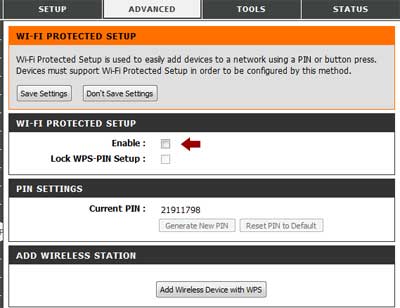
The process to disable WPS varies by router, but these are the basic steps:
- Log into your router using the network address (usually something like
http://192.168.0.1/) with the user name and password. - Navigate to the WiFi Protected Setup (probably under Advanced settings).
- Ensure that WPS Enable is unchecked (or otherwise disabled).
- Save the settings then log out of the router settings.
Routers Using Website Setups Are Insecure
During the above setup, Firefox indicated a potential security risk because this D-Link router doesn't support the HTTPS protocol (it wouldn't load the HTTPS page).
The Netgear AC750 instructs you to log into http://www.routerlogin.net while setting up your login credentials. Not only are you providing your login details to the router's manufacturer, but are vulnerable to malicious activity on the web while you do so.
What I did was to setup dummy login credentials, then use the http://192.168.0.1/ (which wasn't included in the quickstart guide) to login and change the login username and password to something more secure.
Change the Router's Default Settings
You should NEVER use the default settings for your wireless router. These standards are well known and easily found on the Internet.
- First, change the user name and password used to log into the configuration screen to secure your router.
- Next, change the SSID to something meaningful to you that won't identify the router's make or its location.
- Be sure to select the most secure protocol (WPA or WPA2) with a strong password.
If your devices are unable to use WPA or WPA2 protocols, replace them. Downgrading your security makes your entire network vulnerable.
There is more detailed information about wireless security on Wikipedia.
Routers from Shaw or Telus
I used to recommend using a router in addition to the units provided by Shaw or Telus, but this is trickier today and the units provided by both Shaw and Telus have improved significantly.
Cable Access Blocked?
Cable companies (such as Shaw and Rogers) used to block your computer's access to their services like email and other customer-only services once your computer is behind a router. This practice has stopped because it didn't work with the smartphones and tablets used by their customers.
- Shaw customers should use Shaw's documented Mail Server Names, which can differ if you're using IMAP or POP.
- Customers of other cable companies should check with their ISP for details.
Using a Third-party Router with Telus
Some recent equipment provided by Telus has made it more difficult to use your own router, especially if you subscribe to Telus TV. Fortunately, the quality of Telus' routers have improved.
If you need to run your own router, these instructions may help.
- Log into the Telus router and navigate to the Advanced Wireless Configuration settings using a network cable.
- Look for the option to bridge the connection then save the settings.
- Connect your router to the Telus router's Port 1 (NOT the WAN port).
- Now turn off and restart both your Telus and other router.
- Connect your computer to the third-party router.
- You'll probably need to reboot your router (and possibly your computer) to see the new network.
Bridging sends the raw IP addresses coming in directly to your DHCP-enabled router rather than allowing the Telus router to manage traffic.
The following may help with this process:
- Bridge Mode - Using Your Own Router on the Telus forum.
- How to hook up my existing Wireless N router with a Telus modem may help but didn't match the configuration of my current Telus router.
Router Manufacturers
These are some of the common manufacturers of routers:
The reliability of these routers varies and you should do some research before purchasing a new router. Replace anything more than a few years old.
For example, there are security vulnerabilities in D-Link products that contributed significantly to botnet attacks:
I think the FTC was feeling the heat from the botnet attacks, of which we believe there were a lot of D-Link devices included. And let me be clear, D-Link is absolutely at fault for a lot of this. Some of the most basic vulnerabilities have existed in their products for over 10 years that they haven't patched. And that's a pretty — yeah, that's bad. But as you mentioned, it's not illegal to make a bad product.
— Security Now! Transcript of Episode #630.
Other brands can suffer similar issues and some models of the same brand may be more reliable than others.
Update Your Firmware
If you are having trouble with a router, check the manufacturer's site for firmware updates specific to your router (check for FAQs, firmware and other information under Support).
Be sure that you are selecting the right version for firmware as similarly-named models vary between countries as well as versions. An improperly updated device may cease to work.
Unfortunately few manufacturers are willing to update the firmware on older products to repair known issues. They'd rather sell you a new unit and have you send your old one to the landfill.
D-Link Router Security Issue
In 2013 a security vulnerability was reported for several routers including some of D-Link's product line where there is a secret code that bypasses the router's security. Not all D-Link routers are affected and updating the firmware can be somewhat tricky so you might want to review the videos on D-Link's site for the warnings and help.
- Story: D-Link Routers Vulnerable to 'Backdoor' Exploit.
- D-Link (UK) list of affected router models.
- I was unable to locate this information on the Canadian D-Link site but care should be taken to download updates only on the Canadian site for your model if it is affected.
Other Resources
These resources can help to explain some of these issues in greater detail:
- What is a personal firewall?
- Hardware router backgrounder.
- A guide to router hardware terminology.
- Firewall Router Reviews compares several brands and models.
Software Firewalls
Back Up Your Router with a Software Firewall
Software firewalls and routers are each more adept at different, but complimentary, tasks.
You need a software firewall since routers are designed to protect you from intrusions, but can do nothing to protect you from the malware or viruses already present on your computer.
What Firewall Programs Do
A firewall program verifies whether software programs and components are allowed access to the Internet and then enforces it by either allowing or denying access.
A software firewall is an essential part of your protection, particularly if your Internet access is through a broadband connection (which includes virtually everyone these days).
As programs are both sending information and receiving information or installing software, be sure your software firewall is effective and that it protects you from outgoing as well as incoming attacks.
Many Choices — Not All Effective
You can purchase several firewall software packages in retail stores and download and purchase others on-line but the effectiveness of these products varies.
Firewall Quality Varies
Gibson Research Corporation's evaluations are quite dated, but will provide you with a better understanding of the many variables that must be considered in designing a good firewall.
ZoneAlarm Extreme Security Recommended
I strongly recommend ZoneAlarm Extreme Security NextGen for complete security protection while protecting your privacy. A free version is available for personal use.
Windows Firewall Inadequate
Windows users should not depend upon the Internet Connection Firewall that comes with Windows since it offers limited outbound protection.
Microsoft's detection of malware and spyware has improved but most third-party security solutions provide better protection.
Mac Firewall
Mac OS X's firewall, like its Windows counterpart, provides only inbound protection. There is no outbound protection and provides no additional protection if you're behind a router.
Avoiding Security Breaches
You should know how to configure the software properly to avoid a security breach.
- Ensure that your firewall is not circumvented by someone with physical access to your computer.
- Don't automatically give permission to any program requesting access — most setup programs only need access once.
- Personal Internet Firewalls that really work! explains some of the issues.
- can help detect threats and block badly-behaving apps.
"Easy" Solutions Have Drawbacks
Firewalls with ready-made lists of "acceptable" programs probably aren't the safest way to configure a firewall for security — at least not unless you are able to easily change those settings.
Popular Programs Often Poorest Choices
While firewalls preset to allow the most common programs are an attractive feature, the most popular products are often not the safest to use.
If you've spent any time on this site, it will be clear to you that commonly used Microsoft products are some of the worst choices when it comes to security.
Can You Determine Program Access?
You should have the ability to determine for yourself if a program needs access. Disabling access for lesser-known (but more secure) products does no service to the user and may have more to do with the lack of research by the vendor than actual safety issues.
ZoneAlarm Recommended
I strongly recommend a current version of ZoneAlarm Extreme Security.
Testing Your Firewall
Whatever firewall solution you choose, you need to continue to check for breaches of your security.
Hackers are always testing for ways around any solution that is available to the consumer.
The following sites and software will enable you to check your current status and verify the integrity of your firewall.
- Gibson Research Corporation offers several tests and solutions.
- Shields Up is an online test that will check your ports to see if you are vulnerable.
- Leak Test will verify if your firewall is working correctly. No installation necessary.
- Ensure that your firewall is not circumvented by someone with physical access to your computer — one reason that you should change the default user name and password for your router.
Related Resources
On this site:
- Resources index
- Zonealarm security products
- Security software
- Malware & spyware
- Troubleshooting your Internet access
- Network troubleshooting
- Internet terminology
- Network components
Found this resource useful?

Return to top
RussHarvey.bc.ca/resources/firewalls.html
Updated: February 18, 2025